
calmoji
Calendar rituals for people who drift off task.
Most calendars are very good at showing what other people have claimed from you, and surprisingly bad at showing what you meant to protect for yourself.
calmoji is a set of ready-made calendar layers for focus, meetings, seasonal rhythm, and coordination across time zones. Switch the layers on to plan and off to work. When you want a block, claim it by copying it into your own calendar.
No blank weeks. No rebuilding your schedule from scratch. Nothing to break because you had a bad week.
There is no app, no account, and no service to depend on. The calendars are ordinary .ics files that work with Google Calendar, Apple Calendar, Outlook, Proton Calendar, Fastmail, Thunderbird, and anything else that speaks iCalendar.
The Map shows what is possible#
calmoji starts from a simple separation:
The Map shows what is possible. Commitments hold what you have chosen.
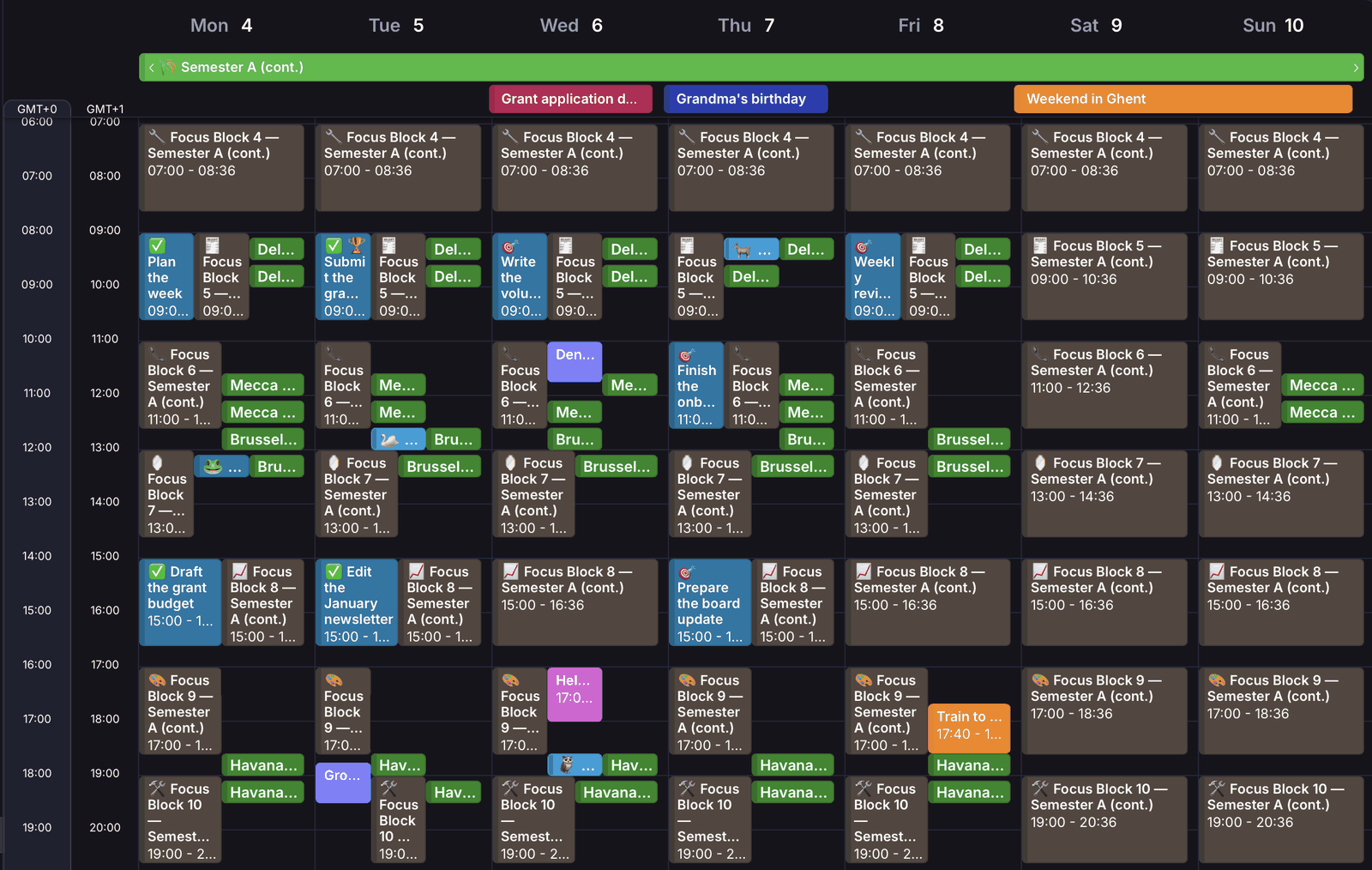
The Map is read-only. It gives the week a shape before you have to decide what to do with it:
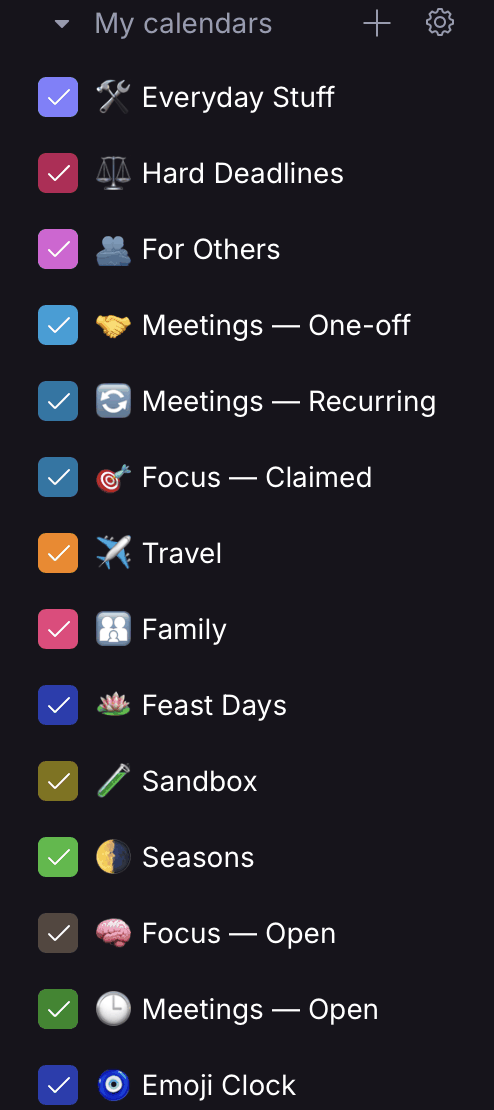
- 🌗 Seasons: the mode you are in, and a reminder that not every part of the year should run at the same intensity.
- 🧠 Focus — Open: a daily palette of focus blocks waiting to be claimed.
- 🕒 Meetings — Open: humane meeting windows across six reference time zones.
- 🧿 Emoji Clock: one stable emoji for every UTC half-hour.
Your real work, meetings, family life, travel, errands, deadlines, and everything else stay in calendars you control.
When you plan, switch the Map on.
When you work, switch it off.
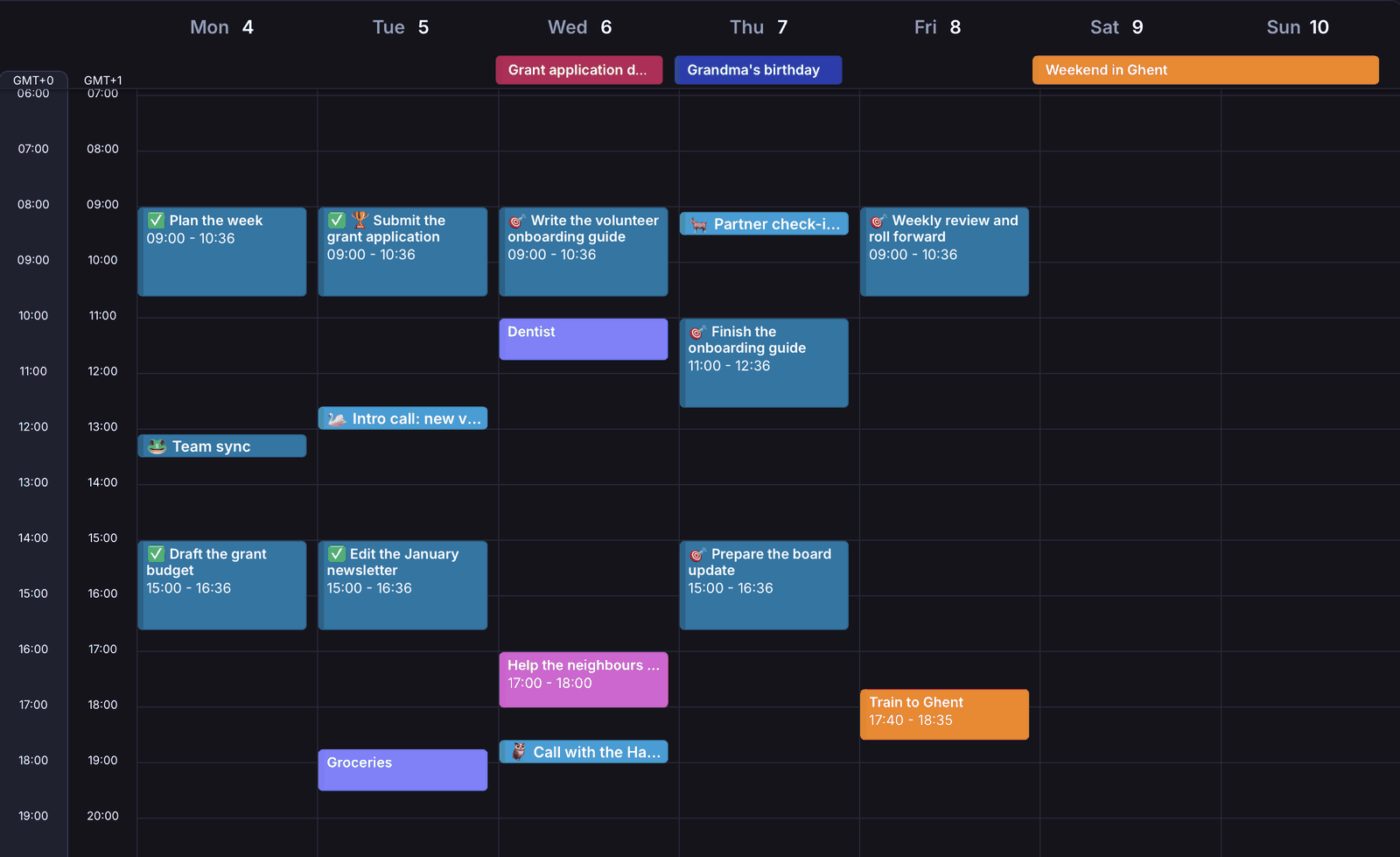
The structure stays underneath either way.
Claim, don’t edit#
An open block is not a commitment.
When you decide to use one, copy it into one of your own calendars and rename it for the thing you intend to do. When it is done, change its 🎯 to ✅.
Search for 🎯 and you can see what slipped. Search for ✅ and you can see what you actually finished.
A bad week does not break anything. Move what still matters. Drop what does not. The next week already has a shape.
The rule underneath is deliberately small:
Trivial? Do it today.
A future commitment? Give it a time.
This does not replace project planning. It closes the gap between “I should do that” and “I will do that on Thursday.”
Start smaller than this page suggests#
You do not need the whole system.
On day one, create two calendars:
- 🧠 Focus — Open: import this month’s focus blocks.
- 🎯 Focus — Claimed: claim one block tomorrow.
That is enough to find out whether the underlying pattern helps.
Add meetings, seasons, the Emoji Clock, colours, status markers, and the rest only when they solve a problem you actually have.
The system should grow out of your life, not ask your life to grow around the system.
The rest of this page explains the other layers, for when you want them. If you would rather just try it, skip to Get calmoji ↓
Focus without another timer#
🧠 Focus — Open divides the day into 96-minute blocks, with breathing room between them.
Ninety-six minutes is not a claim about optimal human cognition. It’s four sides of vinyl: a double album.
When I work from home, the record flips keep time for me: finish a side, stand up, turn the record over, continue. Four sides make one focus block. No timer, no notification, no additional software.
The blocks carry lightweight glyphs for different kinds of work—thinking, writing, reading, technical work, administration, communication, reflection, analysis, making, maintenance, decisions, closure—but they are suggestions, not categories you have to obey.
You will only ever use the few blocks that fall inside your waking day.
Humane meetings across time zones#
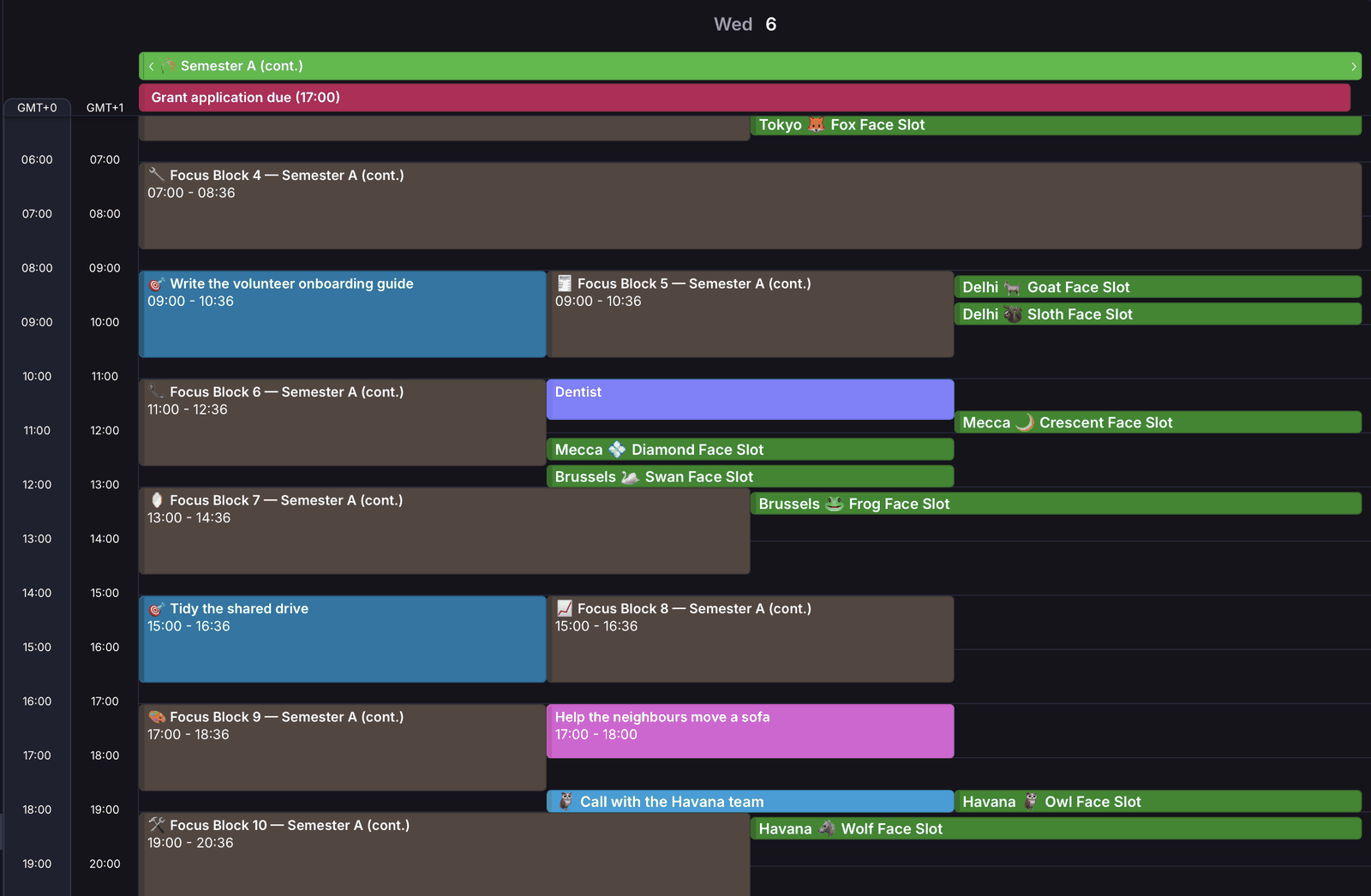
🕒 Meetings — Open provides 25-minute windows positioned around useful parts of the working day across six reference time zones: Tokyo, Delhi, Mecca, Brussels, Havana, and Seattle.
They are reference points, not claims that six cities can represent the world. The purpose is to make the trade-offs visible.
Every slot stays fixed in UTC. Your calendar shows it in your own local time, and its description tells you when it falls locally in the reference city, including daylight-saving changes.
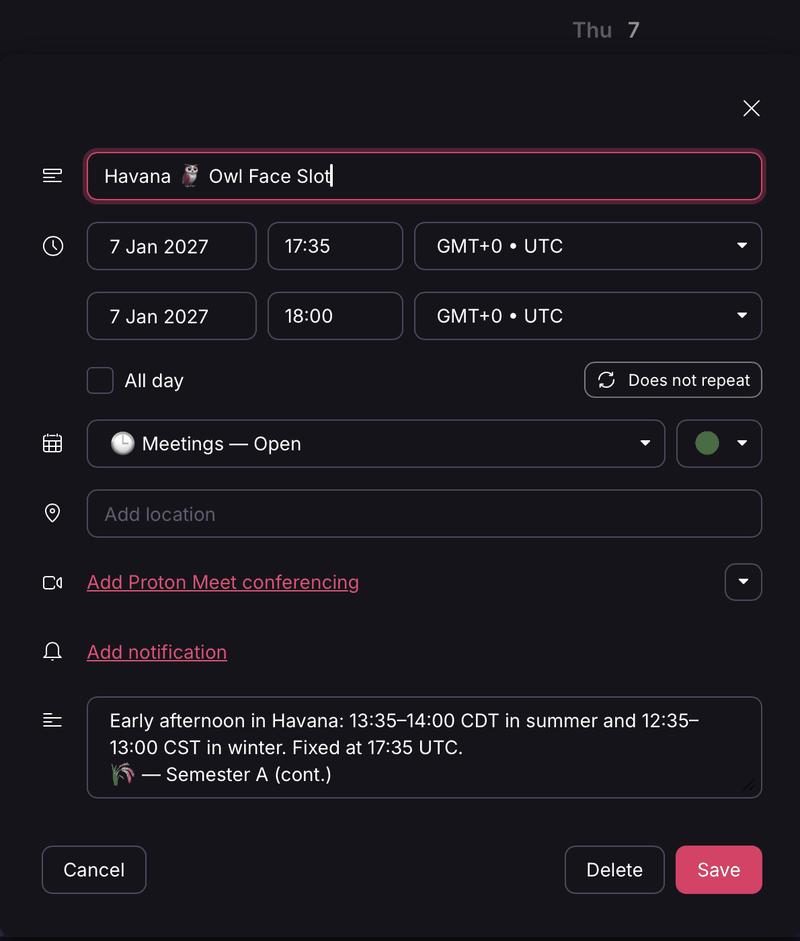
The windows start at :05 or :35 and last 25 minutes. That is deliberate.
Plenty of people spend whole days in calls stacked back to back, each one booked to start the minute the last is meant to end. Something always runs over, or somebody needs a coffee or the loo, so the next call starts at :05 anyway. One person joins anxious and apologising; the other has been sitting there, annoyed.
The call was going to start at :05 anyway. calmoji just admits it.
The five-minute gap before each window gives everyone time to finish a thought, stand up, and arrive.
The result is less arithmetic at the end of meetings, and fewer invitations sent at biologically ridiculous hours.
🧿 The Emoji Clock#
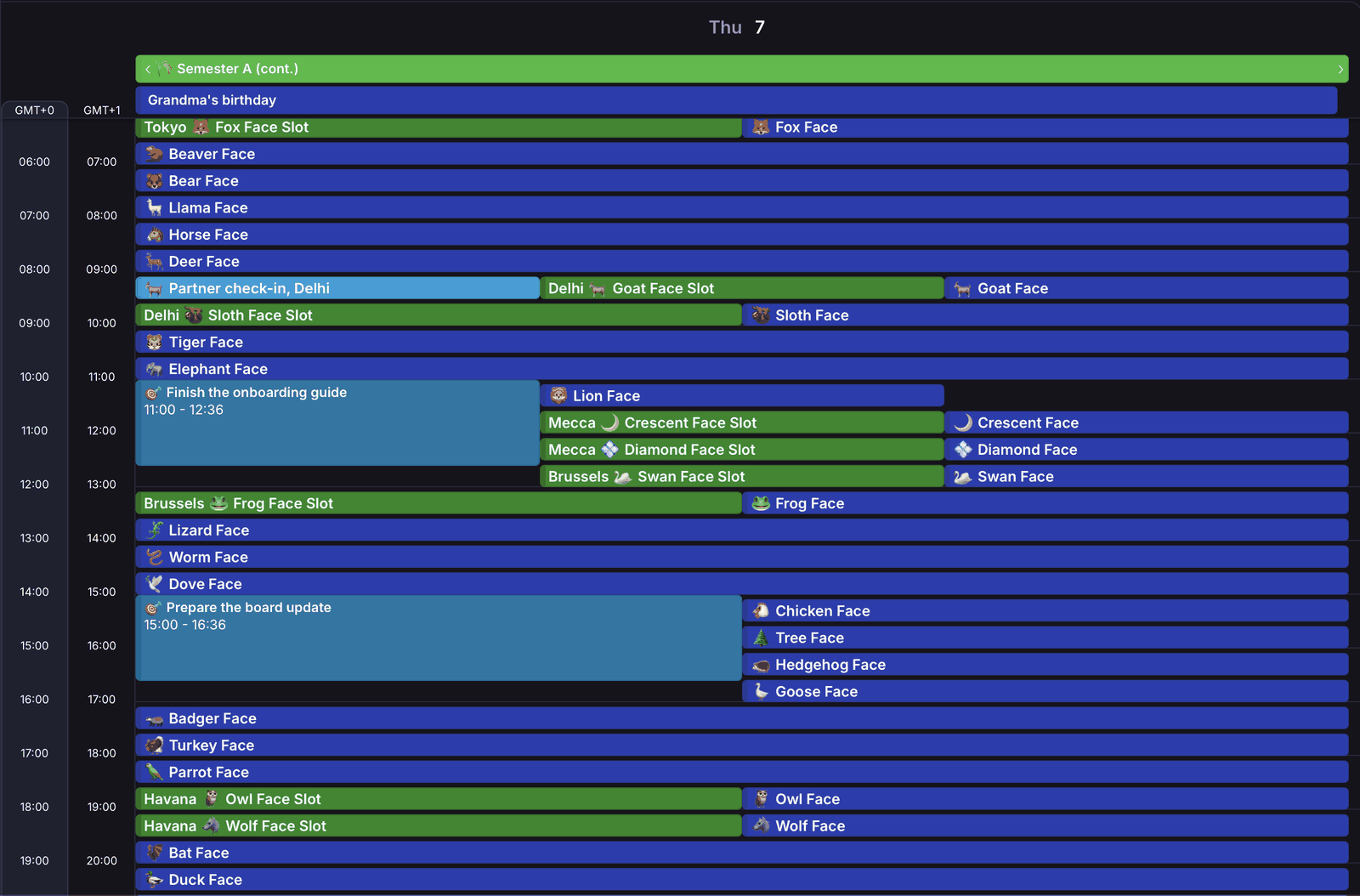
The meeting windows use EBI48, Emoji-Based Interval 48, or simply the Emoji Clock.
EBI48 is a deterministic symbolic notation that assigns a stable emoji identifier to each of the 48 half-hour intervals in a UTC day.
Each slot is anchored at :05 or :35 past the hour. 🐶 is 00:05 UTC. 🦨 is 00:35 UTC. The mapping is the same everywhere.
In calendar form, each emoji appears for 25 minutes, with the same five minutes of breathing room as the meeting windows.
The half-hour is a practical coordination granularity: precise enough for most collaborative scheduling, while keeping the daily symbol set small enough to learn and use.
EBI48 grew out of years of watching international technical calls spend their last ten minutes working out when the next call should happen: which city, which day, whether the clocks have changed, whose school run or commute gets sacrificed this time.
Instead of doing time-zone arithmetic, you pick a day and look for free animals at acceptable times.
On choosing the symbols. Each symbol should have a short, readily pronounceable name that a non-native speaker can say clearly over a bad line; avoid obvious religious, political, sexual, derogatory, or culturally loaded meanings; and remain as visually distinctive as practical across common emoji renderings.
No finite review can guarantee that a symbol is neutral in every culture or context. Corrections and informed objections are welcome.
Symbols identify UTC intervals, not places, peoples, or cultures. 🐸 sits beside Brussels only because it’s the 12:05 UTC slot (14:05 local time in summer), not as a remark on anyone’s cuisine.
EBI48 quick reference#
- 00:05Dog Face
- 00:35Skunk Face
- 01:05Cat Face
- 01:35Bird Face
- 02:05Mouse Face
- 02:35Bison Face
- 03:05Raccoon Face
- 03:35Peacock Face
- 04:05Bunny Face
- 04:35Otter Face
- 05:05Fox Face
- 05:35Beaver Face
- 06:05Bear Face
- 06:35Llama Face
- 07:05Horse Face
- 07:35Deer Face
- 08:05Goat Face
- 08:35Sloth Face
- 09:05Tiger Face
- 09:35Elephant Face
- 10:05Lion Face
- 10:35Crescent Face
- 11:05Diamond Face
- 11:35Swan Face
- 12:05Frog Face
- 12:35Lizard Face
- 13:05Worm Face
- 13:35Dove Face
- 14:05Chicken Face
- 14:35Tree Face
- 15:05Hedgehog Face
- 15:35Goose Face
- 16:05Badger Face
- 16:35Turkey Face
- 17:05Parrot Face
- 17:35Owl Face
- 18:05Wolf Face
- 18:35Bat Face
- 19:05Duck Face
- 19:35Nest Face
- 20:05Mountain Face
- 20:35Turtle Face
- 21:05Seal Face
- 21:35Ladybug Face
- 22:05Squid Face
- 22:35Octopus Face
- 23:05Fish Face
- 23:35Shark Face
Times are UTC. Each window starts at the time shown and lasts 25 minutes.
EBI48 can be used independently of calmoji. Read the EBI48 specification and design notes →
Optional: an AI agenda steward#
calmoji needs no AI.
If you already use an AI assistant, however, the playbook includes a starting prompt for using one as an agenda steward rather than an agenda optimizer.
Its job is not to get more work out of you. It is to help distinguish commitments from intentions and guilt; notice impossible plans; preserve slack; resize things that keep slipping; and occasionally notice when work is quietly consuming health, relationships, household maintenance, contemplation, play, or recovery.
Two of its rules are:
Empty time isn’t automatically available time.
and:
If the plan looks inhuman, fix the plan rather than asking the human to become more machine-like.
The assistant proposes. The human decides.
It may not make commitments, cancel plans, contact anyone, or change the calendar without explicit approval. Calendar titles, descriptions, attendees, links, and attachments are explicitly treated as untrusted data to read, never as instructions to follow.
The act of claiming time remains with the person whose time it is.
Read or adapt the agenda-steward prompt →
About as much data sovereignty as paper#
calmoji never sees your calendar.
It generates files. You import them. Your plans remain in your own calendars with whichever provider you choose.
There is no account to maintain, no database to migrate, no subscription waiting downstream, and no service that has to remain solvent for your calendar to keep working.
Almost every calendar application can import and export iCalendar. If you change providers, take the files with you.
If calmoji is not useful, delete the calendar layers and it is gone. That reversibility is deliberate.
Boring machinery#
Underneath the coloured blocks and emoji, calmoji is deliberately conservative software.
It writes standards-compliant RFC 5545 iCalendar. Timed events use UTC, without floating DATE-TIME values. Text values are escaped. Lines use CRLF and fold at 75 octets. Identifiers are stable. Recurrences are bounded. Builds are deterministic.
The same inputs produce byte-identical files across supported Python versions. There are no runtime dependencies.
The published calendars cover 2026 through 2039. Every file stays within conservative import-size budgets, and the generator refuses unsafe output rather than silently guessing.
If you regenerate a year we publish and get different bytes, that is a bug.
Read the implementation and test strategy →
A small year-2038 test, for free#
The 2038 calendars have a second use.
Signed 32-bit Unix time reaches its limit at 03:14:07 UTC on 19 January 2038. One calmoji focus block and one Emoji Clock slot happen to span that instant, while the 2037 academic-year Emoji Clock exercises recurring events across the boundary.
Import them into a sandbox calendar and see what happens. Missing events, wrong times, truncation, or an import failure are useful findings.
Read the year-2038 test instructions →
Get calmoji#
The ready-made calendars cover 2026–2039 in both academic-year and calendar-year alignments.
Download the latest release, unzip it, create a calendar for each layer you want, and import the corresponding files. Start with this month and next.
Using Proton Calendar? It accepts events only up to the end of 2037, so use the 2026–2036 folders, plus 2037 in the calendar alignment.
For the full setup, suggested colours, weekly loop, privacy pattern, safe regeneration, and optional AI steward: read Living with calmoji →
For the source, generator, tests, issue tracker, and technical documentation: explore Calmoji Forge on GitHub →
Questions, corrections, calendar-app quirks, adaptations, and reports from use are welcome. Tell me what you tried, what helped, and what broke.
So teach us to number our days,
that we may apply our hearts unto wisdom.